Joystick Sensor Module
MC4.0 Joystick Sensor Module: The Joystick Sensor Module works as a handy tool when building interactive electronics. It comes with dual-axis control that tracks movement on both the X and Y axes. This gives accurate directional input making it useful in robotics, gaming setups, or navigation devices. A built-in button adds another way to control […]
Maker & Coder Subscriber? Login to get your discount
MC4.0 Joystick Sensor Module:
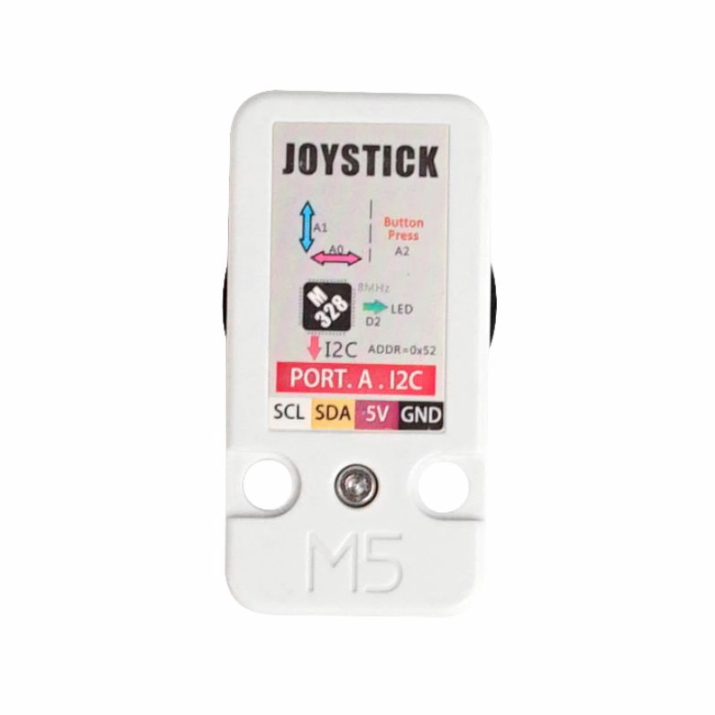
The Joystick Sensor Module works as a handy tool when building interactive electronics. It comes with dual-axis control that tracks movement on both the X and Y axes. This gives accurate directional input making it useful in robotics, gaming setups, or navigation devices. A built-in button adds another way to control giving more flexibility in how you design your systems.
The joystick produces analog voltage signals based on how the stick moves, which allows for smooth and responsive handling. Its push-button switch sends a simple high or low digital signal. This makes it easy to set up both steady and one-time inputs in different kinds of projects.
Small and easy to handle, the Joystick Module fits into many devices without using much room. Its sturdy build offers durable performance even when used in tough conditions.
This Joystick Sensor works well with popular microcontrollers such as Arduino, ESP32, and MCLab. It connects through a 5-pin interface. Running on 3.3V to 5V, it suits most regular electronics projects.
If you’re creating a robotic system, a game controller, or an interactive navigation tool, the Joystick Sensor Module gives reliable and precise control to manage your project. It combines dual-axis analog input with a digital push-button making it a great pick for hobbyists, teachers, and electronics fans who want simple control in their projects.
Benefits of the kit
- Provides dual-axis control (X/Y) plus push-button (Z) input for versatile interactive projects
- Analog signals for smooth directional control and digital button input for precise actions
- Compact, lightweight,perfect for classroom, robotics, and DIY projects
- Works with Arduino, ESP32, and MC4.0 (MCLab) for block-based or Python programming
- Ideal for robotic navigation, game controllers, or interactive interfaces
- Durable construction ensures reliable performance in various conditions
- Easy integration with 5-pin interface, running on 3.3V–5V for most electronics projects
- Enhances STEAM learning, hands-on projects, and hobbyist robotics systems
Features
- Three-axis input: X/Y axis analog input & Z axis button digital input
- 2 x LEGO-compatible holes
- Development platforms: Arduino, MCLab(Blockly, Python)
Includes
- 1 x Unit Joystick
- 1 x HY2.0-4P Grove cable (20cm)
Applications
- Game controller
- Robot remote control
| Specification | Parameter |
|---|---|
| Communication protocol | I2C:0x52 |
| X, Y axis output value | 0-255 |
| Z axis button output | 0/1 |
| Net weight | 11g |
| Gross weight | 27g |
| Product dimensions | 48 x 24 x 32mm |
| Package dimensions | 75 x 45 x 30mm |
Frequently Asked Questions