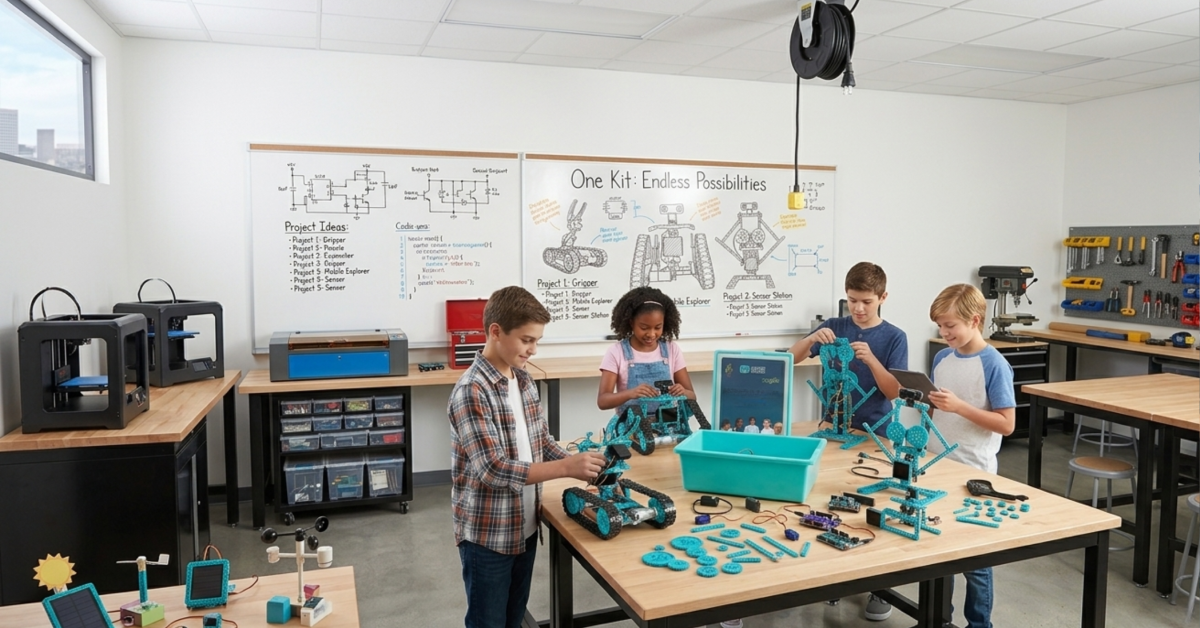
Hands-on learning is a powerful tool for developing future-ready STEAM skills. A single, well-designed STEAM kit can unlock a world of creativity and engineering for students. By providing all the necessary components in one box, these kits make it easy for educators and parents to introduce complex concepts in an accessible way.
This guide will explore five engaging STEAM projects for students that can be built using just one versatile STEAM kit from Maker and Coder. These projects are designed to foster critical thinking, problem-solving, and collaboration. They turn abstract theories into tangible outcomes, making learning both fun and impactful.
Why Use a Single STEAM Kit for Multiple Projects?
Using one comprehensive STEAM education kit for various projects offers significant benefits for classrooms and homes. It streamlines the learning process, reduces costs, and minimizes resource management, making it an ideal solution for schools worldwide.
The primary advantage is efficiency. Instead of sourcing materials for each activity, a single kit provides everything needed for a range of hands-on STEAM learning experiences. This approach is not only cost-effective but also ensures that every student has access to the same high-quality components, promoting an equitable learning environment in any international classroom.
Key Benefits of a Unified Kit system
- Cost-Effectiveness: Purchasing one versatile kit is more affordable than buying multiple specialized sets.
- Simplified Storage: A single box is easier to store and manage than numerous individual components.
- Curriculum Cohesion: Projects built from the same kit can be designed to progressively build on concepts, creating a cohesive learning journey.
- Enhanced Creativity: Limitations can foster innovation. Students learn to think creatively about how to use the available parts to achieve their goals.
Now, let’s dive into the top five STEAM project ideas you can bring to life with a Maker and Coder STEAM kit.
1. Build a Programmable Robotic Arm
A programmable robotic arm is an excellent project for introducing students to mechanics, robotics, and basic coding. This project allows learners to build a functional machine that can pick up and move small objects, providing immediate and satisfying results.
This activity directly connects to real-world applications in manufacturing, automation, and even space exploration. Students will engage with concepts like degrees of freedom, servo motors, and object-oriented programming. It’s a cornerstone of DIY STEAM projects that delivers a high level of engagement.
Learning Objectives
- Engineering: Understand mechanical principles, including levers, joints, and structural stability.
- Technology: Learn to wire and connect electronic components like servo motors and control boards.
- Coding: Write simple block-based or text-based code to control the arm’s movements.
Building the Robotic Arm
The first step is assembling the physical structure using the provided brackets, screws, and base plates. Next, students will mount the servo motors at each joint—the base, elbow, and gripper. Finally, they connect the servos to the microcontroller board and upload code from a computer to bring their creation to life.
2. Design a Smart Weather Station
A smart weather station is one of the most practical STEAM activities for schools. This project empowers students to build a device that collects and displays real-time environmental data, such as temperature, humidity, and barometric pressure.
This project merges environmental science with technology, encouraging students to become citizen scientists. They can track weather patterns, analyze data, and even make predictions. It’s an ideal project for demonstrating how STEAM fields work together to solve real-world challenges.
Learning Objectives
- Science: Learn about meteorology, sensor technology, and data collection methods.
- Technology: Gain experience with various sensors and how they interface with a microcontroller.
- Math: Practice data analysis, graphing, and interpreting trends over time.
How It Works
Students connect temperature, humidity, and pressure sensors to the main control board in their STEAM kit. They then write code to read the data from these sensors at regular intervals. The information can be displayed on an included LCD screen or sent to a computer for logging and analysis, turning the classroom into a miniature data science lab.
3. Create an Automated Mini Greenhouse
This project introduces students to the concepts of automation and biology. By building an automated mini greenhouse, learners create a self-regulating environment that can care for a small plant, controlling light, moisture, and temperature.
This hands-on project is a perfect example of how technology can support sustainability and agriculture. It’s an engaging way to teach future-ready STEAM skills while exploring topics like botany and closed-loop systems. The project is highly visual and provides long-term engagement as students watch their plants grow.
Learning Objectives
- Biology: Understand the basic needs of plants (light, water, temperature).
- Automation: Learn to use sensors and actuators (like water pumps and LED lights) to maintain specific conditions.
- systems Thinking: Design a system where different components work together to achieve a common goal.
Assembling the Greenhouse
Using the kit’s components, students build a small enclosure. They install a soil moisture sensor, a temperature sensor, an LED grow light, and a small water pump. They then program the microcontroller to check the sensors and activate the light or pump when conditions fall outside the desired range.
4. Engineer a Security Alarm system
A DIY security alarm system is a fantastic classroom STEAM project that teaches the fundamentals of electronics, logic, and programming. Students build a device that can detect motion or an open door and trigger an audible alarm.
This project is highly interactive and allows for a great deal of customization. Students can experiment with different types of sensors and outputs, learning how circuits and conditional logic work. It’s a fun and practical way to introduce core electrical engineering concepts.
Learning Objectives
- Electronics: Understand basic circuits, sensors (like ultrasonic or infrared), and outputs (like buzzers and LEDs).
- Programming: Use conditional statements (if-then-else) to create a logical response to sensor inputs.
- Problem-Solving: Troubleshoot wiring and code to ensure the alarm functions as intended.
Project Steps
Students connect a motion sensor or a magnetic door switch to the microcontroller. They also connect a buzzer and an LED. The core of the project is the code: students write a program that constantly checks the sensor’s status. If motion is detected or the door is opened, the code triggers the buzzer and flashes the LED.
5. Construct a Line-Following Robot
Building a line-following robot is a classic STEAM project for students that introduces the principles of robotics, sensor technology, and control algorithms. The robot is designed to autonomously follow a black line on a white surface, a foundational task in mobile robotics.
This project is often used in robotics competitions worldwide, making it a great way to prepare students for more advanced challenges. It combines mechanical assembly, electronic wiring, and logical programming into one exciting activity that is popular in STEAM projects worldwide.
Learning Objectives
- Robotics: Learn about chassis design, motor control, and autonomous navigation.
- Sensor Technology: Understand how infrared (IR) sensors work to differentiate between light and dark surfaces.
- Algorithms: Develop a simple control algorithm that uses sensor feedback to steer the robot.
Building the Robot
The project begins with assembling the robot’s chassis and attaching the motors and wheels. Next, students mount the IR sensor array at the front of the robot and wire it, along with the motors, to the control board. The final step is programming the robot to read the IR sensors and adjust the speed of the left and right motors to stay on the line.
Frequently Asked Questions (FAQ)
A STEAM kit is an all-in-one educational package that includes electronic components, building materials, and instructions for a variety of projects. The acronym stands for Science, Technology, Engineering, Arts, and Mathematics. These kits are designed to make hands-on STEAM learning accessible and engaging for students of all ages.
Students can start using STEAM kits as early as elementary school. Many kits, like those from Maker and Coder, offer a low floor and a high ceiling. This means they are simple enough for beginners to start with block-based coding and basic builds, but also offer the complexity (like text-based coding and advanced sensors) to challenge high school students.
No prior coding experience is required for most beginner-friendly STEAM kit projects. Many kits use visual, block-based programming environments that teach the fundamentals of logic and sequencing in an intuitive way. As students advance, they can transition to text-based languages like Python or C++.
These projects develop critical future-ready STEAM skills. Students learn to think critically, collaborate with peers, solve complex problems, and be creative. They also gain practical experience in rapidly growing fields like robotics, programming, and data analysis, which are valuable for a wide range of future careers.
Yes, one of the greatest strengths of these STEAM project ideas is their adaptability. For younger students, the focus can be on the mechanical build and basic functionality. For older or more advanced students, the projects can be extended to include more complex coding, data analysis, or custom-designed parts, making them suitable for any international classroom STEAM ideas.
Author Bio
Maker and Coder
The Maker & Coder team is passionate about making STEAM education accessible, engaging, and impactful for students of all ages. By designing versatile STEAM kits and innovative project ideas, they empower educators and learners to explore hands-on creativity and problem-solving. With a focus on fostering critical thinking and future-ready skills, Maker & Coder bridges the gap between theoretical knowledge and real-world applications, inspiring the next generation of innovators and makers.